Testing your setup
Before you rely on this for real money, prove it works. The extension is tested against stock Magento, but your store is not stock Magento — other extensions can interfere with checkout, totals and order flow.
Do this on a staging store if you have one. If you must do it on production, use a test connection in TaxCloud so the transactions are not filed.
1. Tax at checkout
Add something to the cart, go to checkout, enter a real US shipping address, and pick a shipping method.
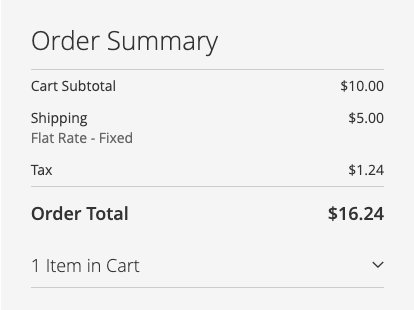
Check:
- Tax appears in the totals
- The amount looks right for that address
- Shipping is taxed, or not, as you expect for that state
Repeat for each kind of product you sell — every distinct TIC, and a mixed cart. This is where a wrong TIC shows up, and the only way to find it is to try it.
Try a few destinations: your own state, a state with different rules, and a state you do not collect in (which should produce no tax).
Then check the cart page estimate: open the cart, fill in Estimate Shipping and Tax with a state you collect in and a ZIP in it, and check that an estimated tax appears. It is based on the ZIP alone, so in a few ZIPs it can differ slightly from the amount charged at checkout — see Estimated tax on the cart page.
2. A completed order
Place the order, then open it in Sales → Orders and in your TaxCloud dashboard.
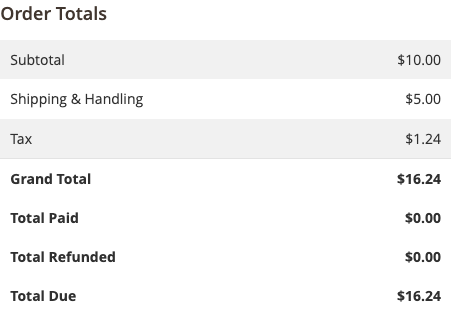
Check:
- The order is in TaxCloud
- The tax amounts match exactly (percentages may differ slightly — rounding)
- The right TICs, quantities and prices are on each line
- The shipping line is there with the right TIC
If the order is not in TaxCloud at all, check your capture trigger — with On payment it will not appear until you invoice it.
3. A refund
Create a credit memo — a partial one, which exercises more than a full refund.
Check:
- The refund appears in TaxCloud
- Only the refunded items are reversed
- Shipping is reversed only if you refunded it
- The amounts match
Then try a full refund on another order.
4. A cancellation
Place an order with an offline payment method, leave it uninvoiced, and cancel it.
Check:
- The sale is reversed in TaxCloud, or was never reported, depending on your capture trigger
- Nothing is left showing as a completed sale
5. Exemptions, if you use them
With exemptions on, attach a certificate to a test customer and order as them.
Check:
- Signed in, shipping to a covered state → no tax
- Signed in, shipping to a state the certificate does not cover → tax
- As a guest → tax
- The exempt order records the certificate on the order view
The second and third are as important as the first: they prove the exemption is being applied deliberately rather than tax simply being broken.
6. Failure behaviour
Worth knowing before it happens for real rather than after.
Set API Timeout to 1 temporarily and place an order. Depending on
fallback you should see either no
tax or Magento's own rate — and an error in the log.
Put the timeout back afterwards.
7. Check the log
Reading the log — look through what your testing produced. Warnings you can explain are fine. Warnings you cannot are worth understanding now.
Before switching to production
- Every check above passes
- Test transactions cleaned up or accounted for in TaxCloud
- The store switched from a test to a production connection
- Cache Lifetime back to
86400if you set it to0 - Logging back to
Enable - Basicif you set it to Advanced - API Timeout back to its normal value