What the customer sees
With exemptions enabled, signed-in customers get a Tax Exemption Certificates section in My Account.

What they can do there depends on whether you have let their customer group manage certificates themselves — see Letting trusted customers manage certificates.
What is on the page
A list of the certificates held for them:
| Column | What it shows |
|---|---|
| Applies in | The states the certificate covers |
| Issued to | The purchaser named on it |
| Reason | Why the exemption is claimed |
| In use | Which certificate applies to their orders |
| Actions | Remove |
What every customer can do
Review their certificates. Which states they are covered in, on what grounds, and which certificate is in use. This is useful for a business customer who wants to confirm you have their paperwork before placing a large order.
Remove one that is no longer valid. If a certificate has lapsed or an organisation has changed, the customer can remove it themselves. Removing the certificate in use also stops it applying.
Removing from My Account is permanent
It is the same deletion as in the admin — TaxCloud cannot restore it. A customer who removes the certificate in use will start being charged tax until another certificate is in use.
What customers in a trusted group can also do
If the customer's group is one you have nominated, they also get:
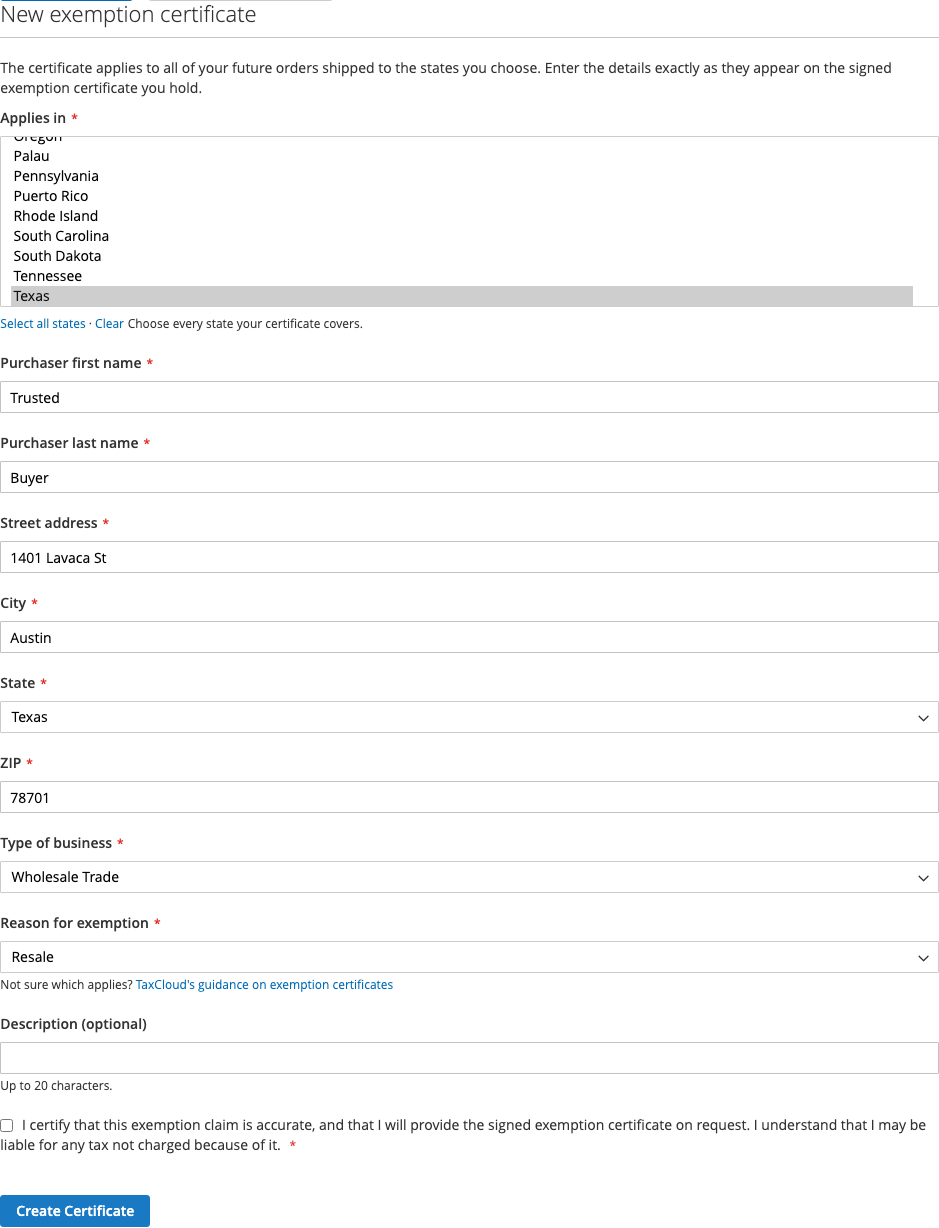
Add Certificate. A form with the same fields as the admin one — the states it covers, the purchaser's name and address, type of business, reason for exemption and an optional description. The purchaser details start from the customer's default billing address, and every field can be changed.
Before submitting, the customer must tick a box certifying that the claim is accurate, that they will provide the signed certificate on request, and that they may be liable for tax not charged because of it.
If the customer has no certificate in use, the new one is put in use straight away. If they already have one in use, that one stays in use and the new one is listed beside it.
Use this certificate / Stop using. The customer chooses which of their certificates is in use, or stops using any.
Refresh from TaxCloud. Re-reads their certificates, for a change made in the TaxCloud dashboard that has not appeared yet.
Every add and every change to the certificate in use is recorded in the TaxCloud log as made by the customer, so you can tell it from a change an administrator made.
What a customer cannot do
Create or choose a certificate, unless their group is trusted. For everyone else, certificates are created and put in use by an administrator, from the admin panel.
See or change their TaxCloud Customer ID. Only an administrator can.
Pick a certificate at checkout. The certificate in use is applied automatically when it covers the destination state. There is no checkout step where the customer picks one.
Nothing changes at checkout
There is no extra checkout step and no "I am tax exempt" checkbox. If the customer has a certificate in use covering the destination state, tax is not charged. If they do not, it is.
That means an exempt customer can see tax on one order and not another — a certificate covering New York does not exempt a shipment to Georgia. If a customer asks why they were charged, How an order becomes exempt has the checklist.
Customers without exemptions
The section only appears for stores with exemptions enabled. A customer with no certificates sees the section with a message saying there are none — nothing is broken.